Sing lead in the Outstanding Tiny Desk AI meme
Upload a clear photo of your face. You become the lead singer of the office-concert band: same shots, same moves, the original song. Add up to four friends as the keyboard player, sax player and the two backup singers – same price.
Photos in:
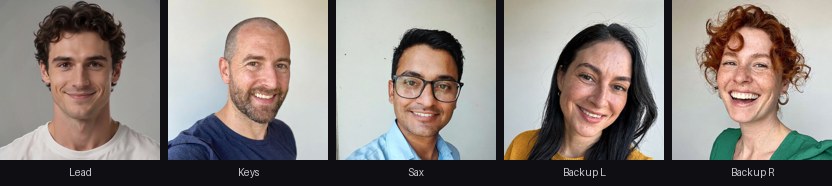
Made from five AI-generated test photos, one per seat, nothing edited afterwards. Seats you leave empty keep AI-generated stand-ins – same shots, same song as the original.
The viral original by @theburnerfromhe11 · Open on TikTok ↗
- ✓ One photo, no app
- ✓ Original song included
- ✓ Ready in ~5 min
- ✓ No watermark
- ✓ Failed videos re-made or refunded
One-time payment · no account · secure checkout by Stripe
1. Add your photo
One adult per photo, face clearly visible. Big phone photos are resized automatically.
2. Choose a pack
3. Get your video
Secure card payment by Stripe. If generation fails, we re-create it or refund you.
How it works
- Upload a clear selfie – add up to four friends for the other seats if you like.
- Pay once – no account, no subscription.
- Your video is ready in about 5 minutes. Download it without watermark and post it.
Tiny Desk AI video at a glance
| You upload | One clear, front-facing photo of one adult for the lead singer – plus optional photos for the keyboard, sax and two backup seats. JPG, PNG, WebP or HEIC. |
|---|---|
| You get | A 15-second vertical MP4 (9:16, 480×854) with the meme’s three shots, the original song and your faces. No watermark. |
| Price | From $6.99 for one video, one-time. Packs: 3 videos $16.99, 5 videos $24.99. Up to 5 people per video at no extra cost. |
| Time | Usually 5–7 minutes from payment to download. |
| If it fails | Re-made for free or refunded – email us the order link. |
| Your photos | Used only for your video and deleted within 30 days. Your video stays at a private link for 30 days. |
| Not allowed | Celebrities, public figures, minors, or anyone who did not agree. |
Which photo works best
Works best
- ✓ One adult, face sharp and turned to the camera
- ✓ Chest-up or head-and-shoulders
- ✓ Even light, no sunglasses, no hat shadow
- ✓ JPG, PNG or WebP – we resize it for you
Avoid
- ✗ Group photos or several faces
- ✗ Side profiles, heavy filters, masks
- ✗ Celebrities, public figures or anyone under 18
- ✗ Photos of people who did not agree
What is the Outstanding Tiny Desk AI meme?
The meme parodies a famous office-desk concert: a soul band squeezed behind a cluttered desk, a lead singer in a headset belting the chorus of “Outstanding”, a red keyboard up front, two backup singers swaying behind it and a sax solo to finish.
In October 2026 a college-football fan used AI to put that weekend’s losing coaches into the band. The clip passed millions of views on TikTok, every fan base made its own version, and people started searching for “tiny desk ai” and “outstanding ai” to make one with their friends, coworkers or family.
The joke is the casting: people who would never form a band, giving it everything on a soul classic. That is exactly what this tool does – you choose who sings and who plays, we keep the shots, the timing and the song.
Looking for the Tiny Desk AI video by description?
Many people have seen the clip but do not know what it is called. If you searched for any of these, this is the one:
• the AI video of football coaches singing behind an office desk
• the “Outstanding” soul song meme with a band around a red keyboard
• the desk concert meme where a guy in a headset sings and a sax solo ends it
• the AI trend where friends or coworkers are turned into a soul band
People call it the Tiny Desk AI video, the Outstanding AI meme, the Tiny Desk concert meme or the Charlie Wilson Outstanding trend. They all mean the same 15-second clip, and this generator makes it with your faces.
The five seats in the band
The clip has three camera shots and five performers. Every seat can be you or a friend; any seat you leave empty keeps its AI-generated stand-in.
• Lead singer – the close-ups at the start and in the middle, headset on, hitting every chorus. This is the seat most people take.
• Keyboard player – sits in front at the red keyboard in the group shot and shows up again at the edge of the final shot.
• Backup singer, left – stands behind the keyboard on the left in the group shot.
• Backup singer, right – stands behind the keyboard on the right, the one who dances the most.
• Sax player – the close-up that ends the clip with the solo.
One photo per seat, one person per photo. One to five people cost the same.
What you get
A 15-second vertical MP4 (9:16, 480×854) with the same three camera shots, cuts and timing as the meme, the original song, and the faces you uploaded in the seats you chose. No watermark, ready for TikTok, Instagram Reels and YouTube Shorts.
Most videos are ready in about 5–7 minutes. Your video stays at a private link for 30 days; download it as often as you like. Packs of 3 or 5 videos let you make versions for different friend groups without paying again.
How we tested it
Before launch we cast the full band with five AI-generated test portraits – different ages, skin tones and hair – one per seat, and ran the order exactly as a customer would: upload, pay, wait, download. The result is the example video at the top of this page, not edited afterwards.
What we learned: the lead singer and the sax player are filmed in close-up, so their likeness comes out strongest. The keyboard player and backup singers are smaller in the group shot, so a sharp, front-facing photo matters most for them. Photos with sunglasses, heavy filters or several faces gave the weakest results, which is why we ask for one clear face per photo.
How to make your Outstanding AI video, step by step
• Step 1 – Pick your cast. Decide who sings lead. If friends join, decide who takes the keyboard, the sax and the two backup spots. Ask everyone first.
• Step 2 – Choose the photos. One photo per person: face sharp, looking at the camera, chest-up, in even light. A recent phone selfie is ideal. Avoid sunglasses, hats that shade the eyes, beauty filters and photos with other faces in them.
• Step 3 – Upload. Tap each seat above and add the matching photo. The lead singer seat is required, the others are optional. Photos are resized automatically, so large phone pictures are fine.
• Step 4 – Choose a pack and pay. One video, or a pack of 3 or 5 if you want versions for different groups. Payment is a one-time card payment through Stripe – no account, no subscription.
• Step 5 – Wait about 5–7 minutes. Your private order page shows the progress and plays the video as soon as it is ready. Download it, then post it with the song and tag your band.
If the result does not look like you
Most likeness problems come from the photo, not the person. A face turned sideways, a dark or blurry picture, sunglasses or a strong filter give the AI too little to work with, and it fills the gaps with the stand-in’s features.
For the best result, use a photo taken at arm’s length facing a window, without glasses if you can. Seats in the group shot (keyboard and backup singers) are smaller on screen, so a clear photo matters even more there.
If a face still came out wrong, email us your order link: we re-create the video for free, and if that does not fix it we refund you.
Which pack should I choose?
One video is enough if you just want yourself on lead vocals. Most people who buy a pack make one version per group: one with coworkers, one with old friends, one with family. A pack of 3 brings the price down to $5.66 per video, a pack of 5 to $5.00.
Each video in a pack can have a different cast – up to five people every time. After your first video is ready, the order page shows a “Make another video” link that uses the next credit without paying again.
Why not edit it yourself?
You could try: film yourself singing along in front of a cluttered shelf, match the three camera angles, sync your mouth to the song and cut it like the original. In practice it takes hours, needs four friends in the same room, and rarely looks like the meme.
The generator keeps the meme’s exact shots, cuts and timing and only changes the faces, so the joke lands the way people expect. Your friends do not even need to be in the same city – a photo each is enough.
Who people put in the band
Coworkers for the team chat, the birthday friend, the group that came last in the fantasy league, the whole family at the holidays, a sports team after a big loss – or just yourself as the singer who finally made it. Everyone you cast must be an adult who agreed to it.
Posting it on TikTok, Reels and Shorts
The video already contains the song, so you can post it as is. On TikTok you can also add the trending “Outstanding” sound to get into the trend feed.
Tag the people you cast, say who sings lead in the caption, and use the hashtags people search for: #tinydeskai #outstandingai #tinydesk. Most platforms ask you to label AI-generated content – turn on the AI label when you post.
Your photos and privacy
Photos are used only to make your video and are deleted within 30 days. We never use them for advertising and never sell them. Celebrities, public figures and minors are not allowed, and anyone who finds themselves in a video without consent can have it removed – see our DMCA & takedown page.
Our test, seat by seat
We cast all five seats with AI-generated test portraits and ran a normal order. Left: the photo we uploaded. Right: a frame from the finished video. Nothing was retouched.
Lead singer – man with curly hair
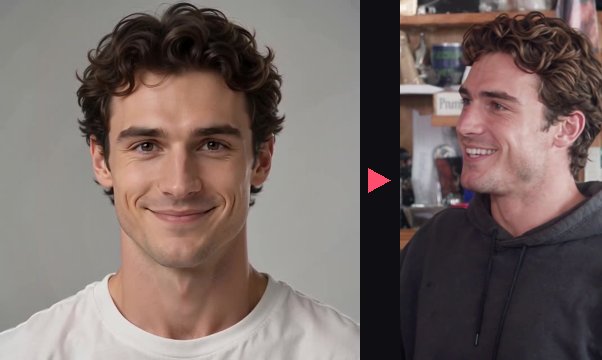
A plain front-facing photo in a white T-shirt. The lead singer is filmed in close-up, so this seat comes out most like the photo: hair, smile and face shape carry over, and the outfit becomes the band’s dark hoodie.
Keyboard player – bald man with a beard
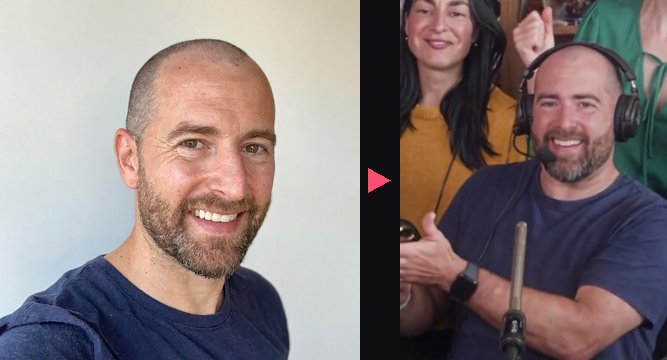
A slightly tilted selfie. Even though the keyboard player is smaller on screen, the beard, head shape and grin are clearly his. He also appears at the edge of the final sax shot.
Backup singer, left – woman with long dark hair
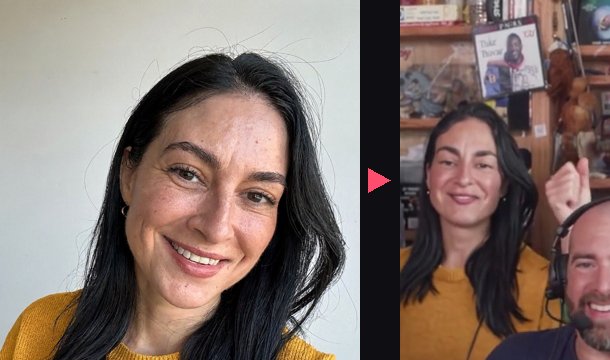
A close, smiling photo in a mustard sweater. The backup singers keep the clothes from their photos, which makes friends easy to recognise in the group shot.
Backup singer, right – woman with red curly hair
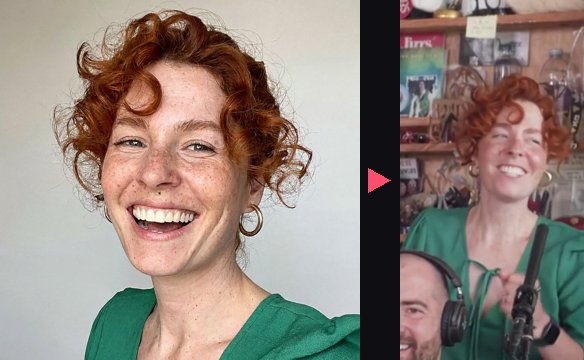
A laughing photo with freckles. Big, distinctive hair survives the small group shot best – she is instantly recognisable while she dances.
Sax player – man with glasses

A front-facing photo with glasses. The sax player gets the final close-up with the solo; glasses and the light-blue shirt carry over.
How we compare
| Tiny Desk AI Video | Typical alternatives | |
|---|---|---|
| People per video | Up to 5, same price | Often 1–3; the full band costs extra |
| Account | Not needed – pay and download | Often sign in or credits first |
| Sound | Original song included | Some give a silent clip |
| Price | From $6.99, one-time | $6.90–$9.90 for the first video, then credit packs |
| If a video fails | Re-made free or refunded | Credits returned |
Based on the public pricing pages of other Tiny Desk AI generators, November 2026.
FAQ
How long does it take?
Usually about 5–7 minutes. Keep the order page open or bookmark the link – the video appears there automatically.
Which photo works best?
One adult, face clearly visible and turned to the camera, good light, chest-up, no sunglasses or heavy filters. Big phone photos are resized automatically.
How many people can I add?
Up to 5 in one video – lead singer, keyboard, sax and two backup singers – for the same price. Only the lead singer photo is required; empty seats keep the AI musicians.
Does the video include the Outstanding song?
Yes. The finished video has the original song from the meme, in sync with the singing and the moves.
How long is the video and what format is it?
15 seconds, vertical 9:16 (480×854) MP4 – the format TikTok, Reels and Shorts use. Landscape is not available for this template.
Is there a watermark?
No. You download a clean MP4 without our logo.
Do I need an account or an app?
No. Upload, pay once with a card, and download from your private order page – bookmark it to come back later.
How long is my video kept?
Your video stays at its private link for 30 days. Download it to keep it longer. Uploaded photos are deleted within 30 days.
Can I post it on TikTok?
Yes, for personal posts. Turn on the platform’s AI-generated content label when you post, and only post people who agreed to be in it.
Is this the real NPR Tiny Desk?
No. This is an independent fan-made parody tool, not affiliated with NPR, Tiny Desk Concerts or the original performers. The band members you do not cast are AI-generated people.
Can I use a photo of a pet, a group photo or a cartoon?
Not for now: one real adult face per photo works best. Group photos confuse who goes in which seat.
What if my face is not swapped well?
Email support@tinydesk-ai-video.com with your order link and we re-create the video for free or refund you.
Can I use photos of other people?
Only with their permission. Celebrities, public figures and minors are not allowed.
How do I contact you?
Email support@tinydesk-ai-video.com – we usually reply within 24 hours.